macOS · SwiftUI · CrossOver
TruckersMP Mac Launcher
From Terminal commands to a native Mac app.
An unofficial community launcher that brings TruckersMP CLI into one Mac app — so starting a drive does not begin with a console window.
- My role
- Product · Interface · Integration · Distribution
- Status
- Released · stable 1.7.0 / build 31
01 / The problem
Starting the game was the hard part.
Manual commands, CrossOver bottle selection and an unreliable startup sequence stood between opening the launcher and entering the game. A graphical button alone would not solve the underlying freezes.
02 / My approach
Keep the proven sequence. Remove the friction.
The launcher integrates TruckersMP CLI and an internal pseudo-terminal, preserving the launch order and waits that worked during manual testing. D3DMetal and MSync form the tested graphics profile; an already running Steam session is reused when appropriate.
03 / Beyond the launch button
Build the parts that make an app distributable.
The native SwiftUI interface adds separate ETS2/ATS profiles, English/German/Hungarian localisation, setup checks and reviewable diagnostics. Developer ID signing, Apple notarization and signed Sparkle updates complete the release workflow.
04 / The result
A stable release, with a tested update path.
Version 1.7.0 was confirmed stable during owner testing, and the update to stable build 31 completed successfully. These are results on the owner’s Mac, not a performance benchmark or compatibility guarantee for every configuration.
Before you download
- Apple Silicon Mac running macOS 13 or later.
- CrossOver with working D3DMetal/MSync; Windows Steam and a purchased Windows edition of ETS2 or ATS in the same bottle.
- A TruckersMP account, internet connection and a supported game version.
- CLI and Python are included. CrossOver and games are not included. Microphone access is requested for voice integration.
Unofficial community project. Not affiliated with or endorsed by TruckersMP, SCS Software or CodeWeavers.
Earlier demo · version 1.4.4
From the launcher to the road.
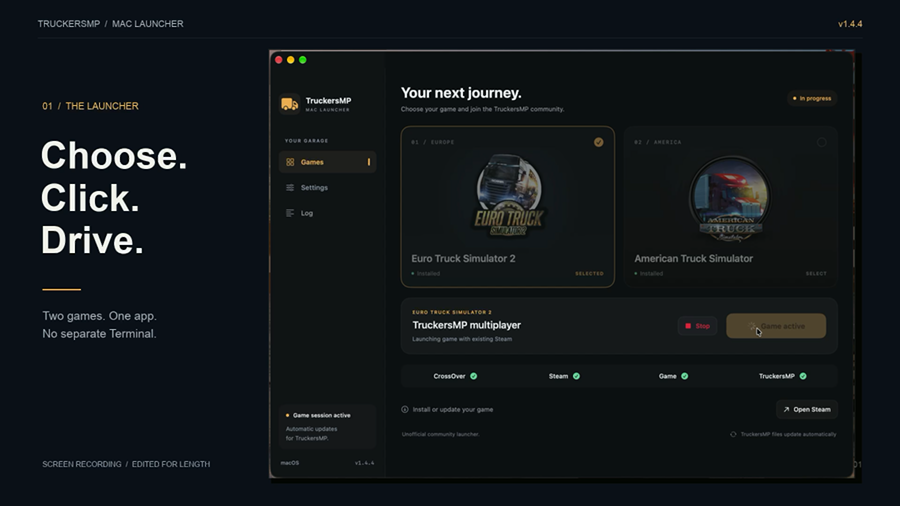
Edited screen recording: selecting a game in the launcher, followed by gameplay. Music, no spoken instructions. The current release is 1.7.0.
Keep exploring
ElvunoExpiry